FORTUVA Automation Engine
Open-source automation tools for Fortuva Solana blockchain prediction platform. Choose between a beautiful GUI or powerful CLI. Automate your cryptocurrency prediction strategy while maintaining full control.
Built for Solana: Fortuva Automation Engine is designed specifically for the Fortuva Solana blockchain prediction platform, leveraging Solana's speed and efficiency for optimal performance.
🔐 100% Secure
Your private key never leaves your device. Runs locally with full control.
- • Environment variable storage
- • Dedicated wallet support
- • No external data collection
Fully Automated
Places predictions automatically, claims rewards, and manages your account 24/7.
- • Automatic prediction placement
- • Reward claiming
- • Prediction cancellation & closing
🎯 Smart Strategies
Configurable prediction modes with Martingale-like progression and round-based logic.
- • GENERAL & PAYOUT modes
- • Odd/Even round strategies
- • Dynamic prediction amounts
📊 Real-time Monitoring
Monitor all engine activity through Fortuva App with live prediction tracking.
- • Live prediction status updates
- • Balance monitoring
- • Transaction logging
⚡ Interactive Control
Real-time manual prediction control via keyboard input. Change direction anytime.
- • Manual prediction mode
- • Direction override
- • Prediction amount adjustment
🛠️ Easy Setup
Simple installation with comprehensive documentation and TypeScript support.
- • npm install & run
- • Environment configuration
- • Full documentation
🖥️ Automation Engine GUI
Experience the power of Fortuva Automation Engine with an intuitive graphical user interface. No command line required!
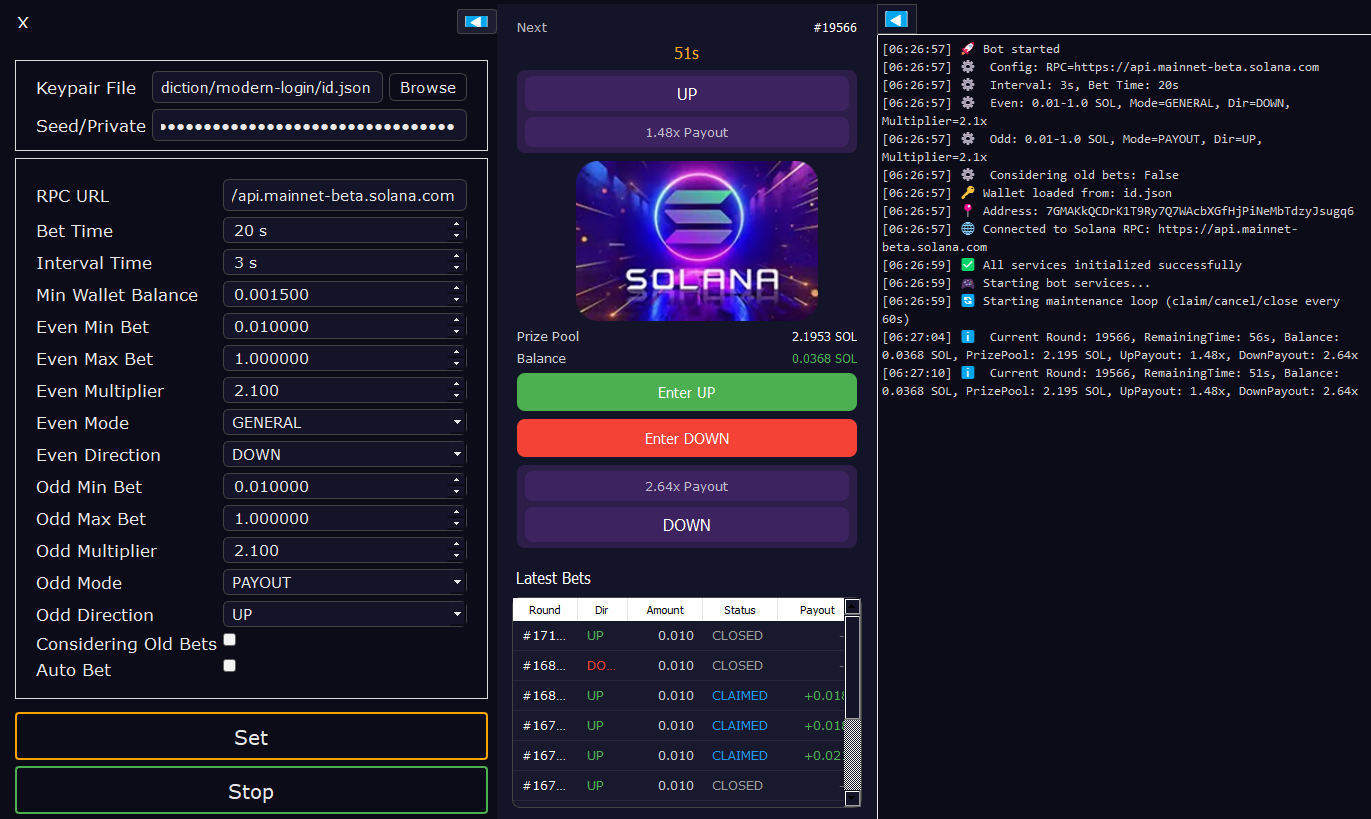
Full-featured GUI with real-time monitoring, configuration panel, and live betting interface
Modern GUI
Beautiful, dark-themed interface built with PyQt5. Visual controls and real-time monitoring dashboard.
Wallet Support
Import via keypair file, seed phrase, or private key. Multiple import methods for flexibility.
Configurable Strategies
Separate settings for even/odd round predictions with customizable parameters.
Live Stats
Real-time round info, payouts, wallet balance, and prediction history tracking.
Notifications
In-app and system notifications for important events. Stay informed at all times.
Persistent Settings
Your configuration is saved automatically. Pick up right where you left off.
Manual Trading
Take control with manual prediction placement when you want to override automation.
Collapsible Panels
Maximize screen space by hiding panels. Customize your workspace layout.
Pre-Built Releases
Download standalone executables for Windows, macOS, and Linux. No Python needed!
🖥️ Platform Support
💻 How to Use the GUI
1. Wallet Setup
- • Option A: Click "Browse" and select your keypair JSON file
- • Option B: Enter seed phrase (space-separated words)
- • Option C: Enter private key (base58 or hex format)
2. Configure Settings
- • RPC URL: Solana RPC endpoint (mainnet-beta default)
- • Entry Time: Seconds before round ends to place prediction
- • Strategy: Set min/max amounts, multiplier, mode, and direction
3. Start Engine
- • Click "Set" to save your configuration
- • Enable "Auto Predict" checkbox for automation
- • Click "Start" to begin automated predictions
4. Monitor & Control
- • View live round info and prediction history
- • Use "Enter UP/DOWN" for manual predictions
- • Click ◀/▶ to collapse panels and maximize space
✅ What It DOES
-
Automates prediction placement — never miss a round due to timing
-
Supports your strategy — run it with any algorithm or manual direction
-
Automatic reward claiming — claims your winnings for you
-
Interactive control — change direction and prediction size anytime
-
24/7 operation — keep playing while you're away
-
FN token rewards — earn tokens on every prediction, even if wrong
❌ What It DOESN'T
-
No price predictions — It does NOT predict whether SOL will go up or down
-
No unfair advantage — All players have the same access to this tool
-
Strategy dependent — Win rate depends entirely on YOUR strategy
-
No insider information — Uses only publicly available data
-
No guaranteed wins — Success depends on your prediction strategy
Why Use the Automation Engine?
24/7 Operation
Keep playing while you're away from your keyboard
Strategy Integration
Run your own trading scripts and connect them to the engine
Automated Efficiency
Never miss optimal prediction windows
Multi-tasking
Focus on analysis while engine handles execution
🛠️ Setup Guides
Choose between the user-friendly GUI version or the powerful CLI version. Both offer the same automation capabilities.
🖥️ GUI Version Setup
📦 Option 1: Pre-Built Releases (Recommended)
Download standalone executables - no Python installation required!
Windows
- Download Windows ZIP
- Extract to your folder
- Run FortuvaEngine.exe
macOS
- Download macOS ZIP
- Extract the .app file
- Launch FortuvaEngine.app
Linux
- Download Linux ZIP
- Run install_linux_deps.sh
- Run ./FortuvaEngine
🐍 Option 2: Run from Source
For developers or if you prefer running from source
Prerequisites
Install Python 3.8 or higher
python --version
Clone Repository
git clone https://github.com/FORTUVA/FORTUVA-AUTOMATION-ENGINE-GUI.git
cd FORTUVA-AUTOMATION-ENGINE-GUI
Install Dependencies
pip install -r requirements.txt
Run Application
python main.py
⌨️ CLI Version Setup
Prerequisites
Install Node.js and npm
node --version && npm --version
Clone Repository
git clone https://github.com/FORTUVA/FORTUVA-BETTING-AUTOMATION-ENGINE.git
cd FORTUVA-BETTING-AUTOMATION-ENGINE
Install Dependencies
npm install
Configure Environment
Create .env file with your settings
cp .env.example .env
Start Engine
npm start
Security Best Practices
🛡️ Wallet Security
- • Create a dedicated wallet for engine operations
- • Never use your main wallet with significant funds
- • Fund only with amount you're willing to risk
🔐 Private Key Safety
- • Store private key in .env file (never commit)
- • Ensure restricted file permissions (600 on Unix)
- • Keep secure backup of your engine wallet
Explore More About Fortuva
🏠 Fortuva Homepage
Learn about the Fortuva Solana blockchain prediction platform, features, and how to get started with prediction games.
Visit Homepage →❓ What is Fortuva?
Discover detailed information about the Fortuva platform, FN tokens, Web3 gaming, and blockchain prediction markets on Solana.
Learn More →